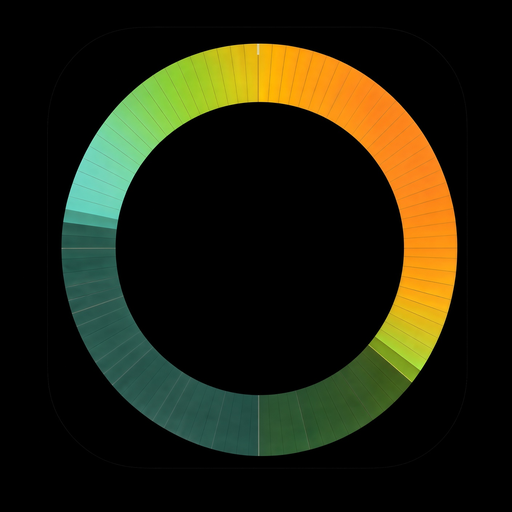
Cairo · Heat & UV
A fresh green morning warms into a deep crimson afternoon heat ring, topped with golden UV mini suns around noon.
Wear OS 6+ · round display · Version 1.5
Today’s weather, right on your wrist.
Your whole day’s forecast in a single 24-hour ring: temperature, rain, snow, wind, UV and air quality, hour by hour. Customise the face and Always-On Display right from your phone.
Works on round Wear OS 6+ smartwatches (Pixel Watch, Galaxy Watch). Bought WeatherRing before 1.5? Your purchase stays unlocked automatically.
New in 1.5: Realistic weather style, animations & air quality →
Yangon · 1.5 Realistic · 26° now (25°–33°)
Watch it in motion
See Classic and Realistic weather styles, gentle wake animations, air quality smog haze, Next days and the companion phone app.
Around the clock · 1.5 Realistic
From dry desert heat to Atlantic rain, tropical thunder, Arctic snow, coastal fog and urban smog: see how the 24-hour ring reads in six cities around the world.
Cairo · Heat & UV
A fresh green morning warms into a deep crimson afternoon heat ring, topped with golden UV mini suns around noon.
London · Rain & wind
Realistic falling rain droplets shimmer across the wet hours alongside wind direction and speed arrows.
Miami · Thunder & °F
Glowing forked lightning bolts, heavy rain droplets and magenta-edged wind arrows for gusts of 75 km/h or more.
Reykjavik · Snow
Six-branched snow crystals drift across a freezing blue ring, scaled to the actual forecast snowfall in cm/h.
San Francisco · Fog
Multi-band coastal fog drifts along the inside of the morning hours before clearing to a sunny afternoon.
New Delhi · Air quality
A brown-amber smog haze along the inner rim marks hours with poor air (EU AQI), paired with UV mini suns.
What’s new in 1.5
Version 1.5 brings a detailed new Realistic weather style, wake-only weather animations, snowfall scaled to real cm/h, European Air Quality Index (EU AQI) smog haze, and a Ring size slider.


Choose between Classic (clean geometric rain streaks, snow ticks, bolts and milky fog band) and the new Realistic style, which draws falling rain droplets, 6-branched snow crystals, glowing forked lightning bolts and multi-band drifting mist in richer detail.
Switch any time in the phone app’s Look tab.
Turn on “Animate weather” in the Look tab and rain shimmers, snow falls, fog and smog drift, and lightning flickers while your watch is awake. Choose from three gentle speeds for each weather group (Calm, Normal or Lively, or Rarely, Normal and Often for lightning) and optionally let the progress lines pulse softly in time with the seconds.
Always-On Display always stays completely still to save battery.

A grey-brown smog haze along the inner rim marks hours when the air is polluted, based on the European Air Quality Index (EU AQI) from the Copernicus Atmosphere Monitoring Service (CAMS) via Open-Meteo.
By default it shows from EU AQI 60 (poor air), hiding cleaner hours, and gets stronger and browner as the air gets worse (mauve at 100+). Adjust “Show from” and “Max smog intensity” in the Look tab.
Features
Temperature, sky glow, night veil, rain, snow, thunder, fog, wind, UV, air quality and Next days, all around a single 24-hour ring.

Mini suns mark the hours with strong UV, from UV 6 by default. A bigger sun means stronger UV, so think sunscreen. You can also switch to UV-scale colour dots (green 1–2, yellow 3–5, orange 6–7, red 8–10, violet 11+).
Choose when they appear and whether to show mini suns or colour dots in the Look tab.

Black arrows on the hour lines point where the wind blows to, with north up. A bigger arrow means stronger wind. Calmer hours get no arrow: by default arrows start at Beaufort 4, a clearly noticeable wind. A magenta edge means gusts of 75 km/h or more.
Choose the minimum wind force, arrow size and gust alerts in the Look tab. Wind isn’t shown on the always-on screen.

Turn on Next days in the Look tab to split the ring: today on the top half, and tomorrow (or the next 2 days) on the bottom half.
Two letters mark the weekday in your phone’s language (for example MO, TU), with that day’s low and high beside them. Choose 1 day or 2 days, which side tomorrow starts on, dividers, curved min and max, and whether the day label sits on the ring or in the sky glow.


Time & typography
Pick your typeface, colour the time from the ring, and choose a blinking or steady colon.

“Default”, “WeatherRing Tech” (our own design), “DSEG7 Classic” (retro digital), “Oxanium”, “Outfit” and “Rajdhani”. Each has a “Bold time” option and works with “Seconds”. On the watch, touch and hold the face → “Customize” → “Time font”, or use the Galaxy Wearable, Pixel Watch or Wear OS app.
Choose white, a preset colour, or “From ring” in the Look tab to colour the time by the current temperature (also used in Always-on).
The colon in the time blinks gently while the watch is awake and stays steady in Always-On Display. Turn “Blinking colon” off under “Customize” on the watch if you prefer it steady.

Interactive guide
Midnight is at the bottom of the ring and noon at the top. Switch between Classic and 1.5’s Realistic style, then tap any layer to isolate it.

Example, not your city.
The ring is one whole day. Midnight is at the bottom, noon at the top. The colour of the ring shows the temperature through the day, and the hand points to the time now.
00, 06, 12 and 18 around the ring are clock hours. The hour labels and the centre numbers can each be turned off in the Look tab, under “Center”.
Companion phone app
The phone app shows a live animated preview of the face. Change the weather style, animations, Next days, sky, weather, display and always-on settings with sliders and preset colour choices, then save, restore or reset to default.


Getting started
Download WeatherRing free on Google Play and try every feature for 7 days. One €0.99 in-app unlock covers the phone app, watch app and watch face.
Step 1
Make sure your round smartwatch runs Wear OS 6 or newer (such as Galaxy Watch or Pixel Watch on Wear OS 6+). Not compatible with Wear OS 5 or older.
Step 2
Install WeatherRing from Google Play on your Android phone. Your 7-day free trial starts automatically, with no account or card required up front.
Step 3
In the phone app’s Watch tab, tap “Install on watch” (or install from Play on the watch), then open the WeatherRing watch app once so it can start syncing.
Step 4
Touch and hold your current watch face, or open the Galaxy Wearable / Pixel Watch / Wear OS app on your phone, and select WeatherRing.

FAQ & Support
Something not working, or a question that isn’t here? Email support@weatherring.net.
WeatherRing is free to download on Google Play and includes a 7-day free trial with every feature unlocked. After the trial, you can keep using WeatherRing with a one-time in-app unlock: €0.99 in eurozone countries (Google Play shows the price in your local currency before you buy). There is no subscription and no advertising, and one unlock covers your phone app, watch app and watch face.
No. Existing buyers who purchased WeatherRing before 1.5 keep full access automatically through Google Play’s licence check. If Google Play doesn’t recognise your earlier purchase right away, open the Unlock screen in the phone app and email support@weatherring.net with the 8-character Support code shown there and your Google Play order number (starting with GPA., from your Google Play receipt email).
Version 1.5 adds the Realistic weather style (detailed rain droplets, 6-branched snow crystals, glowing forked lightning and multi-band mist), wake-only weather animations (“Animate weather”), snow that scales with real snowfall in cm/h, an inner-rim air quality smog haze based on the European Air Quality Index (EU AQI), a Ring size slider (72–100%), a dedicated Next days card in the Look tab, and the 7-day free trial with a €0.99 one-time unlock.
No. “Animate weather” only runs while the watch screen is awake (interactive mode). As soon as the watch enters Always-On Display, all weather animations and the blinking colon stay completely still. You can also adjust animation speeds or turn animations off anytime under Look → Animation.
When air quality is poor, a grey-brown smog haze appears along the inner rim of the ring for those hours, using the European Air Quality Index (EU AQI) from the Copernicus Atmosphere Monitoring Service (CAMS) via Open-Meteo. By default it appears from EU AQI 60 (poor air) and gets stronger and browner as the air worsens (mauve at 100+). Under Look → Sky → Air quality, you can change “Show from” (20 fair, 40 moderate, 60 poor, 80 very poor, 100 extremely poor), adjust “Max smog intensity”, or turn it off.
Open the Look tab in the phone app, open “Next days”, and turn it on to show tomorrow (1 day) or the next 2 days in the bottom half of the ring.
No. Location permission is completely optional. You can search for any city in the Location tab and save favourites without ever granting GPS access.
Every hour by default, or every 2, 3 or 6 hours (on the Watch tab under “Refresh every”). The watch caches the forecast and refreshes on its own over Wi-Fi/LTE if your phone is disconnected or out of reach.
Yes, WeatherRing is available in 14 languages: English, Dutch (Nederlands), German (Deutsch), French (Français), Spanish (Español), Italian (Italiano), Portuguese (Português), Polish (Polski), Russian (Русский), Turkish (Türkçe), Japanese (日本語), Korean (한국어), Simplified Chinese (简体中文) and Indonesian (Bahasa Indonesia). Pick one under Look → Display → Language, or keep “Phone default”.
Requires Wear OS 6 or newer. Not compatible with Wear OS 5 or older, rectangular watches, Fitbit OS, Garmin or Apple Watch. Compatible round smartwatches on Wear OS 6+ include Samsung Galaxy Watch 4, 5, 6, 7, 8 and Ultra, Google Pixel Watch 1, 2, 3 and 4, OnePlus Watch 2 and 3, and Xiaomi Watch 2.
No account, no ads, and we never sell data. Your settings and forecast cache live on your phone and watch. See our Privacy policy for full details.
Get WeatherRing 1.5
Free download · 7-day full trial · €0.99 one-time unlock · No subscription, no ads.
Requires a round smartwatch with Wear OS 6 or newer and an Android phone.