Guide
How to read the ring
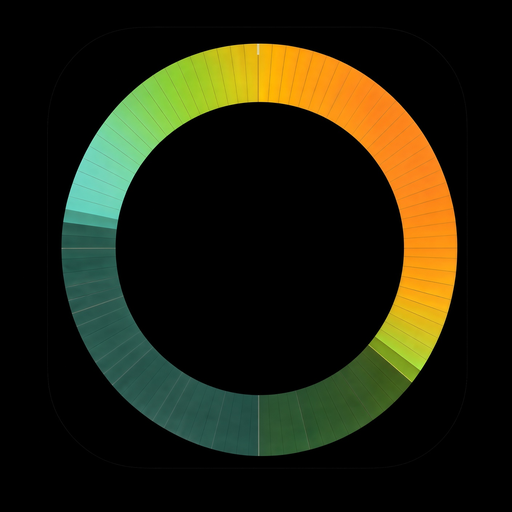
The same example face as in the app. Switch between Classic and 1.5 Realistic style, and tap any layer to isolate it.

Example, not your city.
The ring is one whole day. Midnight is at the bottom, noon at the top. The colour of the ring shows the temperature through the day, and the hand points to the time now.
The three numbers in the middle are today's low, the temperature now, and today's high. 00, 06, 12 and 18 (midnight, 6 am, noon, 6 pm) around the ring are clock hours. Both can be turned off in the Look tab, under Center.
Layer by layer
Every layer shown above, from the 24-hour temperature ring to optional Next days.
- The ring
- The ring is one whole day. Midnight is at the bottom, noon at the top. The colour of the ring shows the temperature through the day, and the hand points to the time now.
- Weather style (Classic or Realistic) New in 1.5
- Choose between Classic (clean geometric rain streaks, snow ticks, lightning bolts and a milky fog band) and 1.5’s Realistic style (falling rain droplets, 6-branched snow crystals, glowing forked lightning and multi-band drifting mist). Switch any time in the Look tab.
- Animate weather New in 1.5
- When Animate weather is on in the Look tab, rain shimmers, snow falls, fog and smog drift and lightning flickers at three gentle speeds while the watch is awake. The Always-On Display stays completely still.
- Now
- The hand shows where you are in the day. The thin lines along the inside and outside edge of the ring fill up from midnight to the hand, so you can see how much of the day has passed.
- Temperature
- Blue and violet are cool hours, orange and red are warm hours. There's also a colour set that is easier to tell apart with colour blindness, in the Look tab under Display.
- Night
- The darker part of the ring is night. It lightens at sunrise and darkens again at sunset. You can make it lighter or darker in the Look tab, under Sky.
- Sky
- The soft glow just inside the ring shows the sky. Gold means sunny, grey means cloudy, and a mix of both means some clouds. After sunset the gold fades. You can change or turn it off in the Look tab, under Sky.
- Rain
- Falling drops show the hours with rain. More rain means more drops. (Classic: Streaks show the hours with rain. Longer streaks mean more rain.)
- Snow
- Falling snowflakes mean snow or sleet instead of rain. Heavier snow means more flakes. (Classic: Small white flakes mean snow or sleet instead of rain.)
- Thunder
- A glowing lightning bolt means a thunderstorm is expected that hour, even if there's only a little rain. (Classic: A small lightning bolt means a thunderstorm is expected that hour, even if there's only a little rain.)
- Fog
- Soft mist along the inside of the ring means fog. The thicker the mist, the denser the fog. (Classic: A milky band along the inside of the ring means fog. The thicker the band, the denser the fog.)
- Wind
- Arrows show the wind from Beaufort 4 (a moderate breeze) or more. They point in the direction the wind is blowing to, with north at the top. A bigger arrow means stronger wind. A magenta edge warns for strong gusts (75 km/h or more). You can change this in the Look tab, under Weather.
- UV
- Small suns appear at the sunniest hours, when the UV index is high (6 or more). A bigger sun means stronger UV, so think sunscreen. You can change when and how they appear in the Look tab, under Sky, UV.
- Air quality New in 1.5
- A grey-brown haze on the inner rim shows hours with bad air (EU air quality index). The worse the air, the stronger and browner the haze. You can change from which level it shows in the Look tab, under Sky, Air quality.
- Optional: Next days
- Optionally, the bottom half of the ring can show the forecast for tomorrow, or for the next two days. Each day shows its weekday letters (like MO or TU) with that day's low and high temperature. You can turn this on in the Look tab, under Next days.
- The three numbers
- The three numbers in the middle are today's low, the temperature now, and today's high. 00, 06, 12 and 18 (midnight, 6 am, noon, 6 pm) around the ring are clock hours. Both can be turned off in the Look tab, under Center.
Wind
Wind arrows
Arrows show the wind from Beaufort 4 (a moderate breeze) or more. They point in the direction the wind is blowing to, with north at the top. A bigger arrow means stronger wind. A magenta edge warns for strong gusts (75 km/h or more). You can change this in the Look tab, under Weather.
Choose the minimum wind force, arrow size and gust alerts in the Look tab. Wind isn’t shown on the always-on screen.

UV index
Mini suns for strong UV
Small suns appear at the sunniest hours, when the UV index is high (6 or more). A bigger sun means stronger UV, so think sunscreen. You can change when and how they appear in the Look tab, under Sky, UV.


New in 1.5 · Air quality
Smog haze on the inner rim (EU AQI)
A grey-brown smog haze along the inner rim shows hours with polluted air based on the European Air Quality Index (EU AQI) from Copernicus (CAMS) via Open-Meteo.
By default it appears from EU AQI 60 (poor air), hiding cleaner hours, and grows stronger and browner as the air gets worse, shifting to mauve-brown at 100+ (extremely poor). You can adjust the threshold and maximum intensity in the Look tab. Not shown on the always-on screen.
Above the time
The slot above the time
Above the time sits a complication slot. By default it shows the watch battery:
- Green from 60%
- Yellow from 20 to 60%
- Red below 20%
Other complications use the clock colour. On the watch: touch and hold the face, tap “Customize”, then tap the small slot above the time to choose battery, steps, another app or Empty.
Optional
Next days Updated in 1.5
Turn on Next days in the Look tab to split the ring: today on the top half, and tomorrow (or the next 2 days) on the bottom half. It’s off by default.
Today then fills the top half, from 00 on the left through 12 at the top to 24 on the right. Tomorrow starts on the right.
The two letters are the weekday in your phone’s language (for example MO, TU), with that day’s low and high beside them. Each day has its own colours, rain, snow, fog, hour lines and night shading.
In the Look tab you can choose 1 or 2 days, which side tomorrow starts on, dividers, curved low and high, and the day label in the sky glow.


Real weather · 1.5 Realistic
6 example cities and weather conditions
Six world cities rendered in 1.5’s animated Realistic style: clean watch faces showing heat & UV, rain & wind, thunder in °F, snow crystals scaled to cm/h, coastal fog and air quality smog haze.
7-day free trial · then €0.99 one-time unlock · No subscription, no ads
Requires a round smartwatch with Wear OS 6 or newer and an Android phone.